Exploration stopped, didn't finish, or found too little
Why a TestOptim exploration ends early or maps few pages, what "Exploration didn't finish" means, and what to check for logins, unreachable sites and limits.
In this article
An exploration usually ends early or maps few pages because your site was unreachable, the pages are behind a login TestOptim could not use, or your plan ran out of pages. Check those first, then start the exploration again.
What does "Exploration didn't finish" mean?
The person who started the run gets this notification (teammates do not), and an email with the subject Exploration didn't finish: (project name), when an exploration fails and TestOptim has used up its automatic retries:
Exploration didn't finish Your project: exploration couldn't finish. Anything already mapped is kept.

- TestOptim retries a failed exploration up to 2 times by itself.
- The cause is not always on your side. Provider or service errors, or running out of pages between retries, can also trigger it.
- Everything that was already mapped is kept.
- The Knowledge page returns to Pending, so you can start again. Generate Test Cases stays greyed out until knowledge is ready. See Can't start exploration, test case generation or a test run.
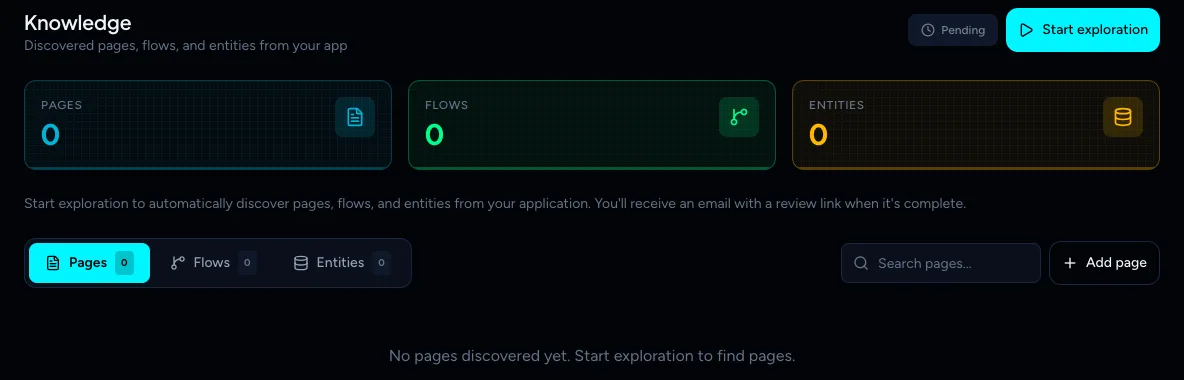
Check that your site is reachable and your login details are current, then select Start exploration again. If it keeps failing, contact support with the project name and the time.
Why did it find 0 pages?
If TestOptim cannot reach your site, the exploration still ends and the knowledge page shows 0 pages, flows and entities. Read the Platform overview box on the Knowledge page. It explains what happened, for example that the hostname does not exist.
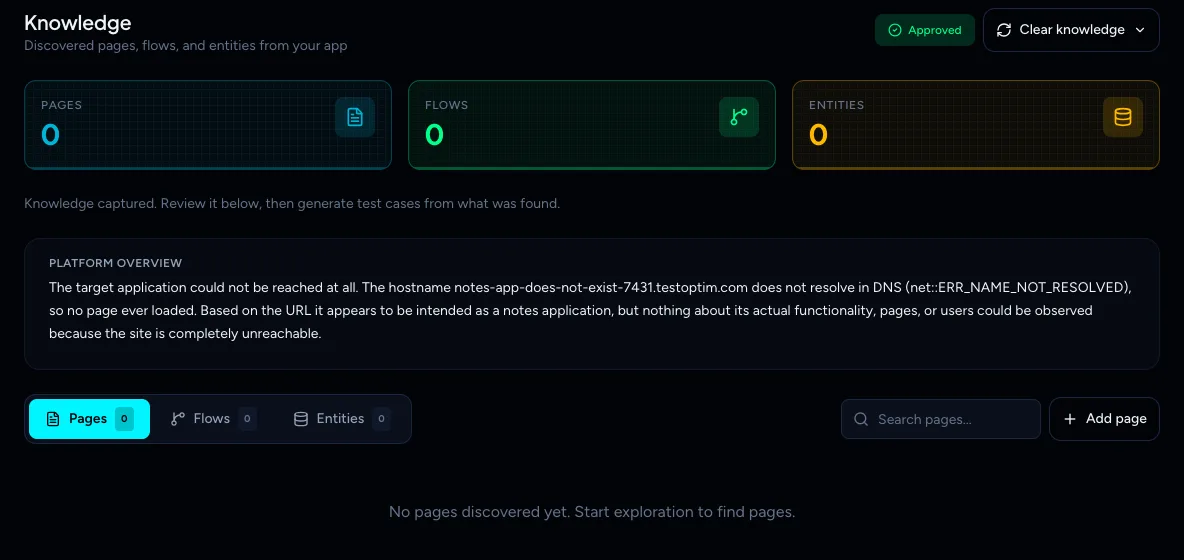
Open the project's Settings and check the URL. The URL cannot be edited after a project is created, so if it is wrong, create a new project with the right one.
Why did it find fewer pages than expected?
Common causes:
- The pages are behind a login. Add a credential profile and make one the default. See Add login credentials to a project. Without credentials, only public pages are explored. A prompt warns you with No Credentials Configured and an Explore Anyway button.
- The login needs a one-time code and nobody entered it. See Enter a one-time code during exploration.
- Your site blocks automated traffic with Cloudflare or another firewall. See Let TestOptim through Cloudflare.
- The page budget ran out. A running exploration is capped at the pages left in your plan. See You have reached your plan limit.
- Your app is very large. An exploration that runs too long is stopped at a time limit (30 minutes) and what was found is kept as a partial map. Run it again, or re-explore later, to cover more.
You stopped it
Select Stop exploration on the Knowledge page to end a run early. The page returns to Pending, but pages found before you stopped may already be saved. Review them, then start again when you are ready. Generate Test Cases stays greyed out until an exploration finishes.
Try again
- Fix the cause above.
- Open Knowledge and select Start exploration.
Each automatic retry also checks that you still have pages left in your plan.
Related
Keep reading
- Troubleshooting"Already in progress for this project" errorTestOptim runs one job per project at a time. See what "already in progress for this project" means, which jobs block each other, and how to proceed.
- Exploration & knowledgeExplore your app to build the knowledge baseStart an AI exploration of your web app in TestOptim, follow its progress live and stop it if needed. The result is your knowledge base.
- Exploration & knowledgeReview what exploration found: pages, flows and entitiesWhat the Pages, Flows and Entities tabs on the Knowledge page mean, and how to tell if your knowledge base is good enough to generate test cases from.
- Exploration & knowledgeEdit the knowledge base and improve it with AIFix what the agent got wrong or add what it missed. Edit pages, flows and entities by hand, or describe the change and let AI refine one item for you.