TestOptim payment failed or won't open
Fix "Payment gateway failed to load", a payment window that never opens, a declined card, and plans that stay "Still processing" after you pay.
In this article
If the TestOptim payment window will not open or your payment fails, the usual cause is an ad blocker blocking Razorpay, or a card that cannot be charged in the selected currency. Payments run through Razorpay in a secure window on top of the TestOptim page.
Before you start
Only the organization Owner can buy or change a plan. See Upgrade, downgrade or cancel your plan.
"Payment gateway failed to load"
The full message is: Payment gateway failed to load. Please disable ad blockers and try again.
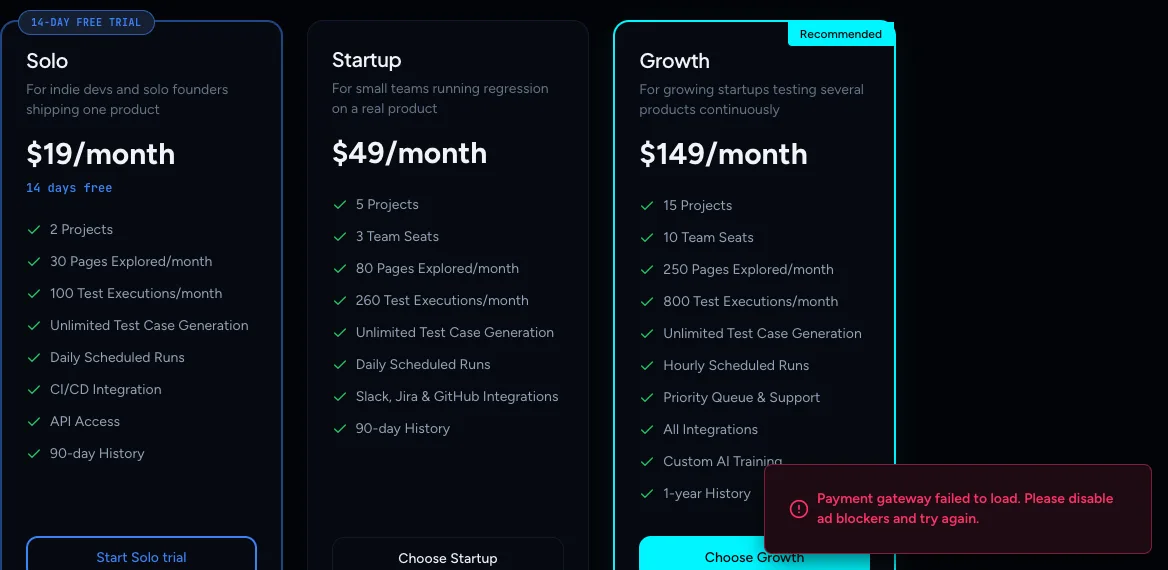
Something in your browser is blocking Razorpay's checkout script, usually an ad blocker, privacy extension or strict network filter.
- Turn off the blocker for the TestOptim site, or allow
razorpay.com. - Reload the page and choose the plan again.
- If it still fails, try another browser, or a network without content filtering.
"Payment window didn't open"
The full message is: Payment window didn't open. This is usually an ad blocker — try disabling it, or use a different browser. The fix is the same as above.
A card is declined
TestOptim shows Payment attempt failed: followed by the reason from the card issuer, and You can retry in the payment window. The window stays open, so try another card or payment method there.
Cards issued in India
Razorpay refuses to charge cards issued in India in USD. In the plan picker or the Change plan or Buy more dialog, switch the currency from USD to INR and try again. The dialogs remind you: "Indian cards must be charged in INR."
You closed the window
If you close the payment window before paying, nothing is charged and no plan is started. Choose the plan again. A checkout you abandon expires on its own after about 30 minutes. A paid subscription is activated automatically even if you close the tab.
After you pay: "Still processing"
After a successful payment you land on a Finalizing your subscription... page while TestOptim confirms it with Razorpay. This usually takes a few seconds. If it takes longer you see:
Still processing. Your subscription is taking longer than expected to activate. Don't start another checkout—we'll keep this one safe while Razorpay finishes.
- Do not pay again.
- Select Check again after a minute.
- If the plan still has not activated, select Contact support (or email hi@testoptim.com) and include the time of your payment.
If you changed plan from Billing, you see a notification instead: "Payment was received, but activation is taking longer than expected. Refresh shortly or contact support if your plan does not update." Refresh after a minute. If the page says "We couldn't load your account", reload it.
A renewal payment fails
If a monthly, quarterly or annual renewal cannot be charged, your subscription is marked past due, we email you, and access to the product is paused until the payment is fixed. The Owner restores access by paying through Billing > Change plan. See No active subscription.
Another error
For "Failed to change plan. Please try again.", or a card verification (3-D Secure) step that times out, try again or use another card. If it keeps failing, email hi@testoptim.com.
Enterprise
Enterprise is not sold through checkout. It does not appear on the plan picker, so contact sales instead.
Related
Keep reading
- Troubleshooting"No active subscription" or "Subscription needs attention"Why TestOptim is locked, what "No active subscription" and "Subscription needs attention" mean, and how the organization Owner restores access. Your data is kept.
- Troubleshooting"You have reached your limit" in TestOptimWhat "You have reached your limit" means in TestOptim: which limit you hit (projects, seats, pages, executions), when it resets, and how to top up or upgrade.
- Troubleshooting"Already in progress for this project" errorTestOptim runs one job per project at a time. See what "already in progress for this project" means, which jobs block each other, and how to proceed.
- Plans & billingCompare plans and what each limit meansSee what Solo, Startup and Growth include, how prices change by billing period, and exactly what counts toward projects, seats, pages explored and test executions.