Run TestOptim tests from CI with an API key
Create an API key, start a TestOptim test run from GitHub Actions, a script or an AI assistant, and fail the build on critical or high issues.
In this article
To run TestOptim tests from CI, create an API key under Settings > API keys, then call the TestOptim API (or paste the ready-made GitHub Actions snippet) to start a run and read the results. The same key works from scripts and from AI assistants such as Claude Code over MCP. The app calls keys "API tokens"; they are the same thing.
Before you start
- You need the Owner or Admin role to create API keys.
- Your project needs generated test cases. See Generate test cases.
- Runs started with a key use your plan's test executions, just like runs started in the app. They're attributed to the person who created the key.
Create an API key
Open Settings from the sidebar, then API keys.
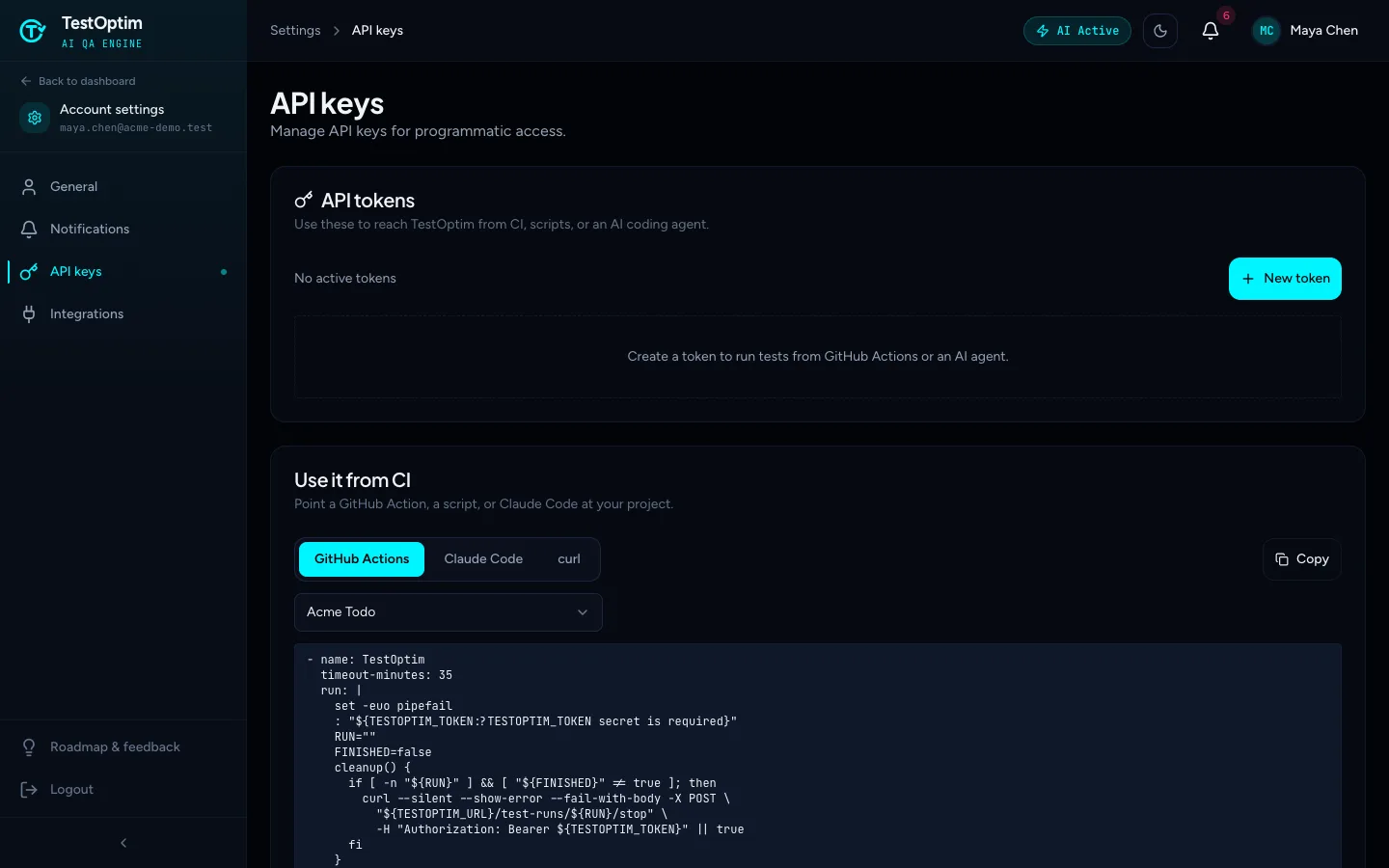
Snippets for GitHub Actions, Claude Code and curl are pre-filled for your project Select New token.
Enter a Name you will recognise, such as
GitHub Actions - Acme Todo.Under Project access, choose All projects or a single project. For CI, pick one project so a leaked secret can't touch the others.
Keep the Permissions you need:
- Read projects (
projects:read) - Read test runs (
tests:read) - Start test runs (
tests:run) - Read issues (
issues:read)
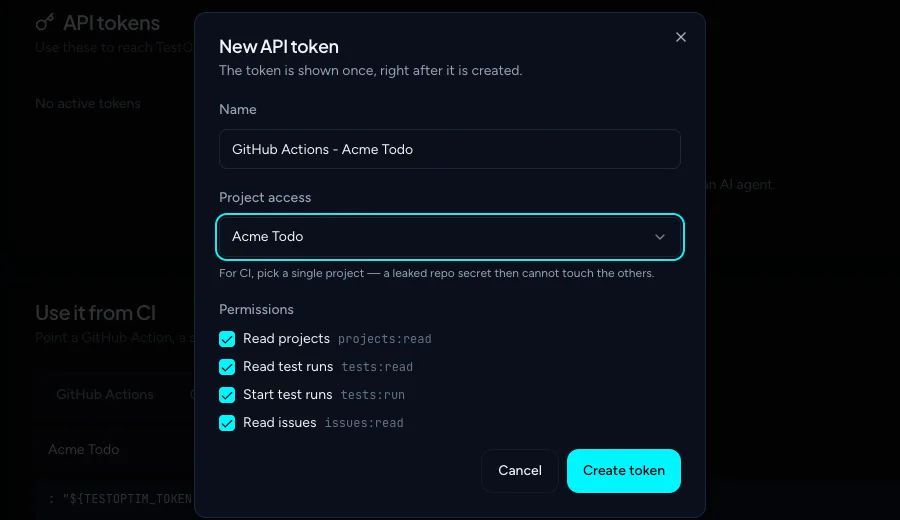
All four permissions are ticked by default. Untick what you don't need. - Read projects (
Select Create token.
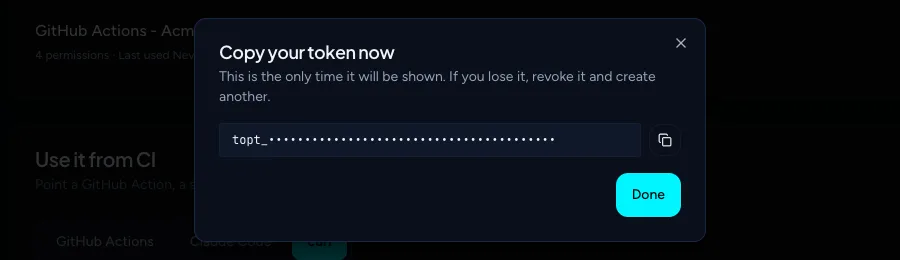
Copy the token from Copy your token now and store it as a secret, then select Done.
Warning
The token is shown once. If you lose it, revoke the key and create another. Never commit a token to your repository.
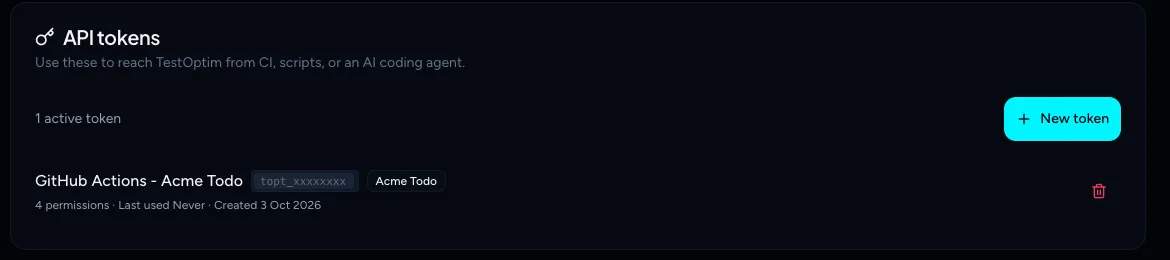
The key then appears in the list with its name, project and last-used time. Use the red bin icon to Revoke it.
Start a run and read results
Calls use your token as a bearer token. The base URL is https://api.testoptim.com/api/v1. Set the token and your project ID first. You can copy the project ID from the snippet on the API keys page.
export TESTOPTIM_TOKEN="topt_..."
export PROJECT="<your-project-id>"
export BASE="https://api.testoptim.com/api/v1"
Start a run of your whole suite. Like Run all in the app, it is trimmed to your remaining executions, and the response does not say so, so check totalCases on the run if a partial suite should fail your build:
curl -X POST "$BASE/test-runs/projects/$PROJECT" \
  -H "Authorization: Bearer $TESTOPTIM_TOKEN"
To run only some tests, send their IDs:
curl -X POST "$BASE/test-runs/projects/$PROJECT" \
  -H "Authorization: Bearer $TESTOPTIM_TOKEN" \
  -H "Content-Type: application/json" \
  -d '{"testCaseIds": ["<test-case-id>"]}'
The response is 202 Accepted with the new run:
{ "_id": "<run-id>", "projectId": "<your-project-id>", "status": "pending" }
Check a run:
curl "$BASE/test-runs/<run-id>" -H "Authorization: Bearer $TESTOPTIM_TOKEN"
The response includes status (pending, running, completed, failed or stopped), progress (0 to 100), issuesFound, a stats object with totalIssues, critical, high, medium and low counts, totalCases, startedAt, completedAt and currentActivity.
List issues for the project:
curl "$BASE/issues/projects/$PROJECT" -H "Authorization: Bearer $TESTOPTIM_TOKEN"
The response is a page of summaries: { "data": [...], "total": 5, "page": 1, "limit": 20 }. Each item has _id, projectId, title, severity, category, status and createdAt. Fetch one issue in full, with its steps and expected and actual behaviour, from GET /issues/{issueId}.
Stop a run:
curl -X POST "$BASE/test-runs/<run-id>/stop" -H "Authorization: Bearer $TESTOPTIM_TOKEN"
The response is the run in its current state. A stopped run is reported with status stopped, and stopping a run that already finished simply returns it.
Reference
| Call | Needs permission |
|---|---|
POST /test-runs/projects/{projectId} |
Start test runs |
GET /test-runs/{runId} |
Read test runs |
POST /test-runs/{runId}/stop |
Start test runs |
GET /issues/projects/{projectId} |
Read issues |
GET /issues/{issueId} |
Read issues |
The issues list takes optional status, severity, page and limit query parameters.
Note
There is no API call to list your projects or test cases. Copy the project ID from the snippet on the API keys page. To run specific tests, you need their IDs; otherwise leave testCaseIds out and the whole suite runs. An AI assistant connected over MCP can list your projects.
Limits and errors:
- 120 requests per minute, counted per client IP address, so CI runners that share an IP share the limit.
- A project-limited key gets
403for any other project, and a key without the needed permission gets403too ("Token is missing required scope(s)"). - Without a valid token the API answers
401("Missing API token" or "Invalid API token"). A revoked key stops working immediately. - If a run is already in progress for the project, starting another is refused. Wait for it to finish and retry. A push that triggers a GitHub re-exploration can cause this, because a project runs one job at a time.
Fail a build on critical or high issues
The GitHub Actions snippet on the API keys page does this for you. It:
- Starts a run of the whole suite.
- Checks the run every 10 seconds for up to 180 attempts (30 minutes).
- When the run is
completed, fails the job if it found any critical or high issues. If the runfailedor wasstopped, it fails the job too. - Stops the run if the CI job is cancelled or the time runs out.
Add your token as a repository secret named TESTOPTIM_TOKEN and paste the snippet into a workflow step.
Warning
The snippet runs the whole suite and gives up after 30 minutes. For a large suite, pass testCaseIds to run a subset, or raise the number of attempts in the loop (and the step's timeout-minutes). A timed-out run is stopped, so it shows as stopped.
Use TestOptim from an AI assistant (MCP)
TestOptim also speaks MCP, so assistants like Claude Code can start runs and read issues for you. The Claude Code snippet on the API keys page shows the command:
claude mcp add --transport http testoptim https://api.testoptim.com/api/mcp \
  --header 'Authorization: Bearer ${TESTOPTIM_TOKEN}'
Then ask, for example, "run the QA suite on my project and show me the critical issues". The tools are list_projects, start_test_run, get_test_run, stop_test_run, list_issues and get_issue. A tool is only available if the key has the matching permission.
Frequently asked questions
How do I fail a build on critical issues?
Use the GitHub Actions snippet above: it fails the job when a completed run has critical or high issues. In a custom script, read stats.critical and stats.high from GET /test-runs/{runId}.
Does TestOptim have an MCP server?
Yes. See the section above. Connect it with one command and the same API key.
Related
Keep reading
- Integrations & APIConnect Slack and use /testoptim commandsPost test results, new issues and run failures to a Slack channel, choose which events to send, and use /testoptim to list issues or start a run from Slack.
- Integrations & APIConnect Jira and sync issue statusFile the issues TestOptim finds into a Jira project automatically or by hand, and keep their status in sync both ways, including optional re-verification when Jira marks one Done.
- Integrations & APIRe-explore automatically on every GitHub pushConnect a GitHub repository so each push or merged pull request re-explores your app and refreshes its knowledge. It does not run your tests; use CI for that.